728x90
※ Linux: Script.
안녕하세요. 듀스트림입니다.
여러분을 스스로를 믿으십니까?
좋습니다. 그럼 이제 진짜 믿을만한지 기록을 한번 해보도록 하겠습니다.
script는 터미널에서 일어난 모든 출력(필요 시 입력까지)을 파일로 기록합니다.
기록은 세션 종료 시에 완성되며,
기록 시 타이밍 정보를 추가하면 scriptreplay로 원래 리듬 그대로 재생할 수 있습니다.
• 대부분의 배포판에 기본으로 제공합니다.(util-linux 패키지)
• man script, man scriptreplay로 매뉴얼을 확인하시면 됩니다.
사용 방법
cd /tmp

# 기록 시작
script -q -f -t 2> timing.log session.log

# 명령 실행
echo "[LAB1] start"
date
for i in 1 2 3; do echo "work-$i"; sleep 0.3; done

# 기록 종료
exit # 또는 Ctrl + D

# 재생
scriptreplay timing.log session.log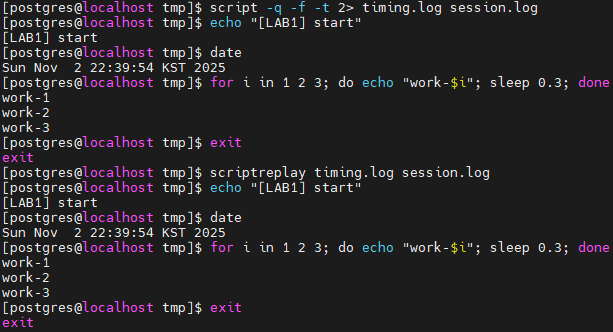
쉽죠? 수동으로는 위 방법으로 하시면 되고, 감사 등 목적으로 뭔가 도구가 필요하다 그러면 아래 링크 툴을 활용하시면 됩니다.
※ asciinema는 오픈소스입니다. (GPL-3.0 license)
Record and share your terminal sessions, the simple way - asciinema.org
Record and share your terminal sessions, the simple way. Forget screen recording apps and blurry video. Experience a lightweight, text-based approach to terminal recording.
asciinema.org
GitHub - asciinema/asciinema: Terminal session recorder, streamer and player 📹
Terminal session recorder, streamer and player 📹. Contribute to asciinema/asciinema development by creating an account on GitHub.
github.com
오늘은 여기까지~
728x90
'Linux' 카테고리의 다른 글
| Linux: rpm 다운로드 방법 (1) | 2025.08.04 |
|---|---|
| Linux: 커널 메모리 관리 파라미터 (1) | 2025.07.28 |
| Linux: 기본 디렉터리 구조 (2) | 2025.07.22 |
| Linux: OpenSSH 사용법 (0) | 2025.02.24 |
| Linux: chage 사용법 (0) | 2025.02.23 |